


In 20th November 2025, Google announced a new feature: the Branded Queries Filter in Search Console. This filter allows site-owners to isolate search-performance data for queries that include a brand name, helping you see how non-branded versus branded traffic evolves.
Why It Matters
- Enables clearer differentiation between branded search traffic (for example your company name or brand) and non-branded queries.
- Helps you understand how much of your search visibility comes from people already aware of your brand versus new users discovering you.
- Lets you tailor optimisation strategies based on whether you’re winning new audience or just servicing brand-aware visitors.
- Helps with forecasting, reporting and proving value of SEO efforts beyond brand recognition.
Key Features of the Filter
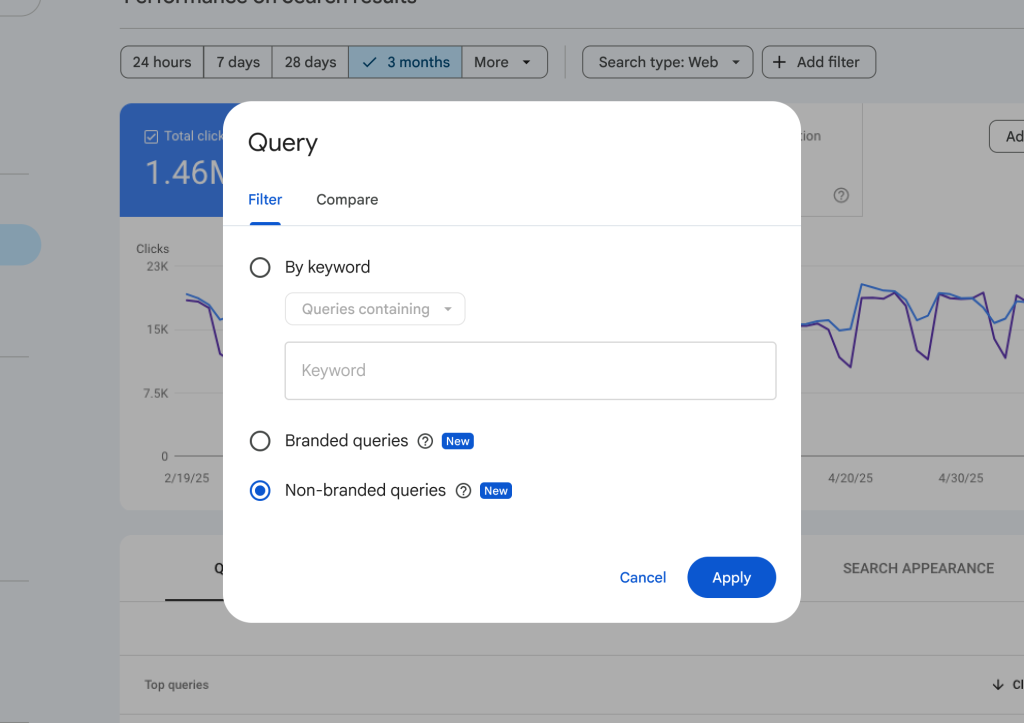
- Located in the Performance report of Search Console under a new filter option for “Branded queries”.
- You can toggle between “Branded only”, “Non-branded only”, or view all queries as usual.
- Works at property level (site or domain) and gives you impressions, clicks, CTR, average position specifically for branded vs non-branded queries.
- Saves you the manual effort of tagging or exporting large query sets and filtering them externally.
How to Use It — A Quick Guide
- Open Search Console → Performance → add filter → Branded queries.
- Select “Branded only” to view how your brand-aware traffic is performing (clicks, impressions, etc.).
- Then toggle “Non-branded only” to assess new‐audience discovery queries.
- Compare the two sets:
- A rising non-branded share suggests you are gaining new visibility.
- A flat or declining branded share may signal stagnation in awareness or top-of-funnel reach.
- Use insights to:
- Optimise content that targets non-branded keywords (new user acquisition).
- Ensure branded landing pages are serving returning users and achieving conversions.
- Align reporting: show clients or stakeholders how much of the growth is “brand-driven” vs “discovery-driven”.
What This Means for Your SEO Strategy
- Focus on discovery keywords: If your non-branded traffic is low, step up your keyword research, content build-out, and link-acquisition for those “new user” queries.
- Don’t neglect brand queries: While discovery is key, branded queries often convert at higher rates—monitor their CTR, position and behaviour.
- Refine your reporting: With the filter, you can present clear data on where your traffic is coming from and how your SEO strategy contributes to both brand and non-brand visibility.
- Optimise landing pages accordingly: Branded queries may hit homepage or brand pages—ensure they are relevant and converting. Non-branded queries may require dedicated content or blogs answering new user search intent.
- Track shifts over time: Use this filter to monitor changes month-over-month. Are you capturing more non-branded traffic? Are brand‐aware users still finding you first?
Integration With Other Tools & Reports
This new filter pairs well with:
- Your keyword research findings (e.g., from Ahrefs or SEMrush) of brand vs non-brand terms.
- User journey/reporting insights: If you notice high branded queries but low conversions, you might need to optimise your brand landing pages.
- Link‐building reporting: Non‐branded growth often stems from external links and brand mentions—focus outreach accordingly.
Final Thoughts
The addition of a branded queries filter is a smart move by Google Search Console, because it grants marketers and SEO specialists a clearer view of traffic origin and brand influence. The ability to separate brand-aware visitors from new prospects simplifies strategic decision-making and reporting. If you haven’t enabled this on your site yet, it’s well worth doing so.
Reference: Google for Developers